B-1/E-23, Mohan Co-Operative Industrial Area, Mathura Road, Delhi-110044, India


- Digital Signature Software
- 19-Feb-2026
- -
- 0 Comments
Our signature is personal. It represents our name, style, and identity. While some people keep it simple, others turn it into art. In today’s highly digitized world, you don’t just sign on paper. You also use a digital signature software and esignature for emails, contracts, and online forms. Thus, a signature should look attractive, authentic because it’s not a mark on a paper, it’s your identity.
If you are planning to change your signature or you want to create it for first time, you will get a lot of helpful stuff in this guide.
Why Your Signature Matters?
It matters because it is not just text on paper or on any digital screen if we consider a digital signature. Your signature reflects your confidence, your character, consistency, and it confirms your identity.
As we are living in a digital world and in this digital world your electronic signature software is just as important as it is handwritten on a paper. You may use it to sign documents online, sign pdf online, approve contracts, or submit forms. Thus, it should be clear, unique, and easy to repeat.
Signature Ideas to Create a Stylish and Professional Look
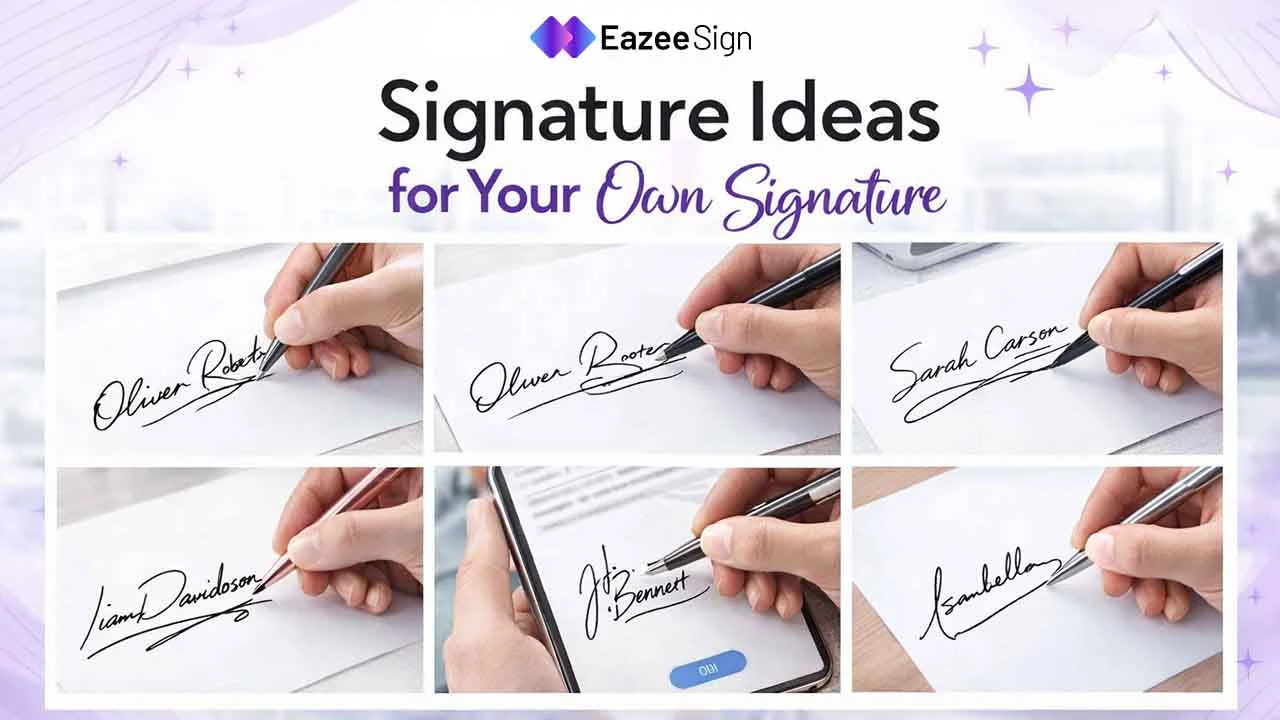
Your signature says a lot about you. It should be simple, unique, and easy to repeat. Whether you’re signing on paper or using a digital Signature, the right style makes a strong impression. Here are some clean and practical ideas you can try.
1. Keep It Simple and Clean
Simple signatures are powerful. You don’t need long curls or complicated strokes. A clean design is easy to write, easy to remember, and easy to scan digitally. Here are some example ideas:
- First name only in stylish cursive
- Initial + full last name
- Just two initials with a smooth underline
Simple works best, especially when using a signature generator or signing digitally.
2. Use Your Initials Creatively
Initial-based signatures look modern. You can merge first and last initials, overlap letters, or connect letters with a single line. For example, you can use a bold first letter and smaller second letter. You can also use a stylish capital letter with a tail. Initial signatures are great for a digital Signature because they look neat even in small spaces.
3. Try a Stylish Underline
Sign your name normally and add a straight or curved underline. It gives a strong finishing touch and adds personality. It makes your signature look confident and complete. You can use a straight underline, a curved one, or a long line that connects to the last letter.
Always remember to keep it balanced. Don’t overdo it. When you sign document online, an underline can make your esignature look professional.
4. Focus on the First Letter
Make the first letter bold and clear and let the rest flow naturally. Many people write the first letter clearly and scribble the rest in a smooth motion. This style is fast and practical. It works well for both paper and electronic signature formats.
5. Add a Personal Touch
Add some unique touch at the end of your name to make it look artistic. You can make your signature unique by adding:
- A small loop
- A sharp ending stroke
- A slight upward slant
- A dot under the name
However, try to keep it subtle. Too many extras make it hard to repeat. Remember, your signature must look similar every time you sign pdf online or on official papers.
6. Use Cursive for Flow
Cursive signatures look elegant. They feel natural and continuous. Besides, they are also harder to copy compared to block letters. Here are some tips for a cursive signature:
- Connect letters smoothly
- Avoid lifting the pen too much
- Keep spacing consistent
If you’re creating a digital signature, cursive styles often look better when uploaded as an image.
7. Try a Minimalist Signature
Minimalist is trending these days. It is short, clean, and sharp. For instance, you can try:
- Just first name in small caps
- One bold letter
- A fast, artistic stroke
This works very well in modern business settings. Moreover, it looks clean when you sign document online.
8. Experiment Using a Signature Generator
If you’re unsure where to start, try a signature generator. A signature generator helps you:
- Test different fonts
- Try cursive styles
- Adjust spacing
- Download your design
It’s helpful for creating an esignature quickly. However, don’t rely only on fonts. Your real signature should still be something that you can write by hand if needed.
9. Make Sure It’s Consistent
This is very important. Your signature should look similar every time. Banks, schools, and offices compare signatures. In digital signature app, your electronic signature must also stay consistent.
If you sign pdf online or approve contracts digitally, use the same format each time. After all, consistency builds trust.
10. Creating Digital Signature
Today, many documents are signed online. When creating your digital Signature, consider these following points:
- Is it readable?
- Is it too long?
- Does it look good in a small size?
- Is it clear in black and white?
A good esignature should be neat, load clearly, and not look pixelated. You can also upload a scanned version or draw directly using a mouse or touchscreen.
Common Mistakes to Avoid
While creating your signature, a few minor errors can affect consistency. While some styles may look good at first but become difficult to repeat later. Before finalizing your wet signature or digital signature, watch out for these common errors:
- Making it too complicated
- Adding too many loops or extra strokes
- Changing the style every time you sign
- Writing it differently on paper and when you sign document online
- Using a plain typed font without personalization
- Creating a design that is hard to replicate consistently
Your signature should feel natural and you should be able to write it quickly. Even when using a digital Signature tool, it should look authentic.
Practice Before Finalizing
Don’t decide in one try. Take a blank paper and write your name 20–30 times. You can try:
- Bigger first letter
- Different slants
- Different speed
- With and without underline
Then choose the one that feels natural, looks clean, and is easy to repeat. Once decided, use the same style for both paper and electronic signature use.
Signature Ideas Based on Personality
Here are some quick ideas based on style. For a professional style, choose clear first letter + short last name and a simple underline. For creative style, opt for curved letters, looped endings, and artistic strokes. For elegant style, select full cursive style and ensure balanced spacing. Ultimately, choose what fits you.
Legal Considerations
Your signature, whether handwritten or a digital signature, represents your consent.
When a person signs a document online, or he/she use a ensign software, it should be secure and have an audit trail which verify their identity. A reliable esign software ensures that any signed document can be altered.
Craft a Signature That Works for You
You know why your signature is so much important, because only you own that, it is hard to copy by anyother person. So there is no need that your signature should be fancy, rather it should be consistent everywhere. Hence it is always advisable that your signature, whether it is handwritten or digital format, it should match your personality and you can easily repeat it.