B-1/E-23, Mohan Co-Operative Industrial Area, Mathura Road, Delhi-110044, India


- Informative/Generic Topics
- 06-Nov-2026
- -
- 0 Comments
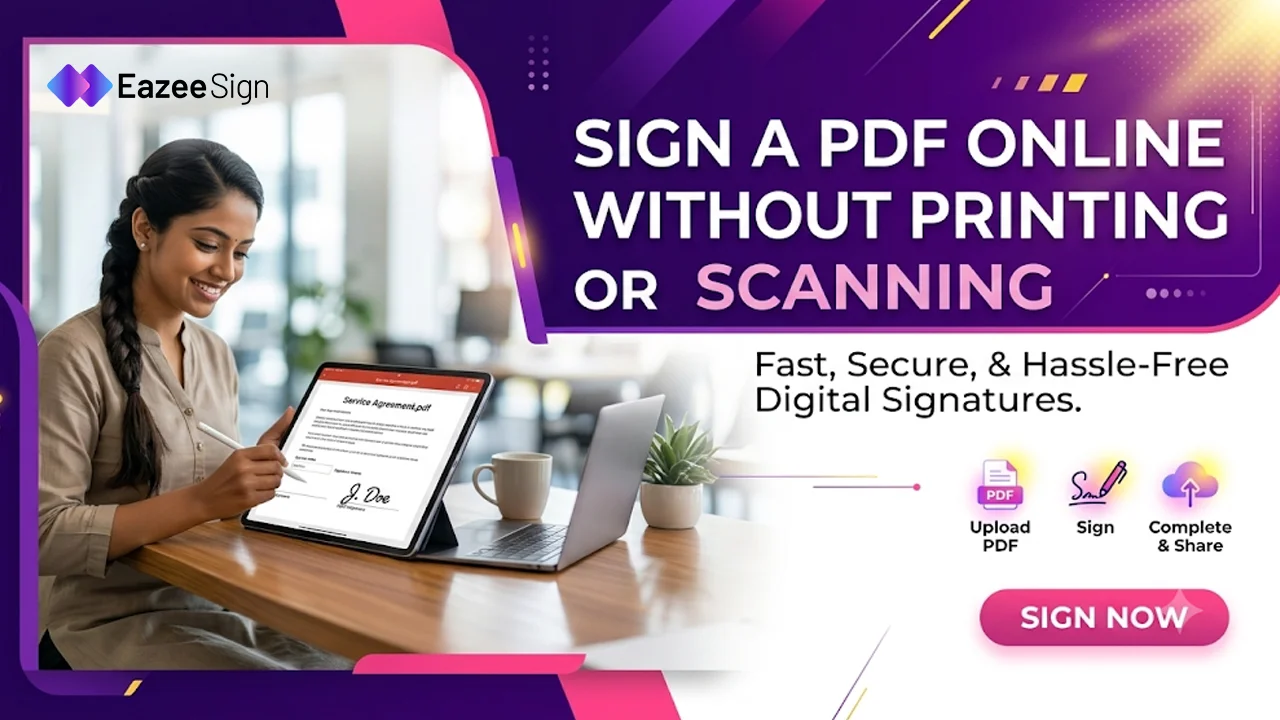
Signing a PDF does not have to involve a printer, a pen and a scanner. You can complete the process online using an electronic signature tool. All you need is your PDF document, an internet connection and a few seconds.
Many people search for ways to free sign PDF online — when they need to sign an application, agreement, consent form or other document. They want a simple way to add their signature without installing any kind of complicated software or dealing with the paperwork.
An online PDF signing tool makes this possible. You can upload your document, add a signature and complete the signing process from your computer or mobile device.
In this guide, we will explain how to sign a PDF online using EazeeSign. We will also cover what to check before choosing an online signing tool and answer some common questions about electronic signatures.
How to Free Sign PDF Online Using EazeeSign
Signing a PDF online is a simple & straightforward process with EazeeSign. You can upload a document, add signer details, prepare signature fields and send it for signing without printing or scanning any doc or anything.
Whether you want to sign any document yourself or collect the signatures from other people, follow these steps to get started easily.
Step1: Visit the EazeeSign website
Visit the EazeeSign website and log in to your account using your registered credentials
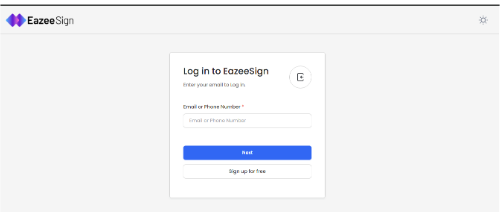
Once you log in — you will land on the dashboard. From here, you can access your documents and start a new signing request.
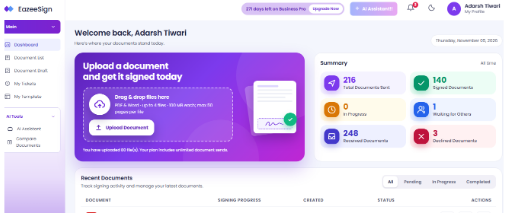
Note – If you are a new user, create an account before proceeding.
Step 2: Upload Your Document
Choose a Document or Use a Saved Template
From the dashboard, select the option to upload a document for signing. EazeeSign allows you to upload PDF or Word files from your device.
You will see two options:
- Upload a New Document: Select a file from your computer and upload it.
- Choose a Template: Select a template that you have already prepared and saved.
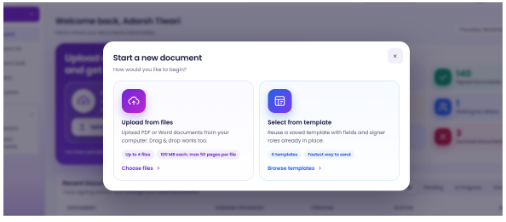
You can upload up to four documents in a single signing request. This is useful when you need to send multiple documents together or sign them as part of the same workflow.
Step 3: Add Signer Details
Enter Recipient Information and Set the Signing Order
Once your document is uploaded, enter the signer’s name and email address.
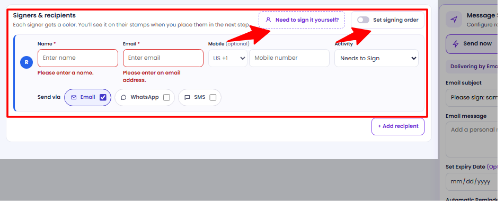
If you want to sign the document yourself, select the Need to Sign It Yourself option.
If the document requires signatures from multiple people, you can also decide the signing order. This allows you to control who signs first and who receives the document next.
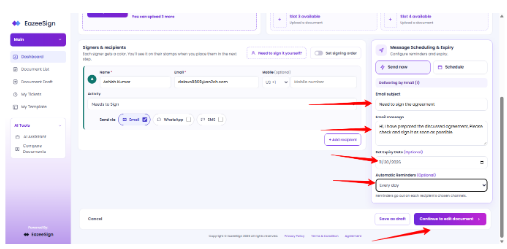
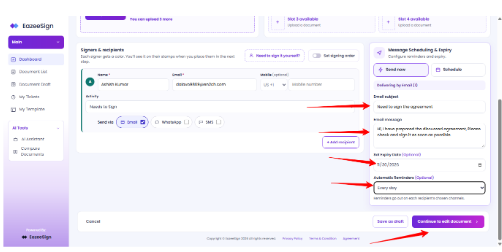
After entering the required details, click Continue to Edit Document to move to the next step.
Step 4: Check Document Readiness
Review AI Suggestions Before Sending
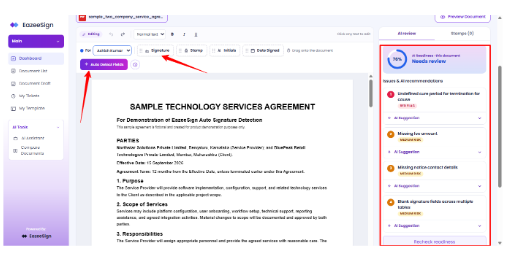
Before sending the document, EazeeSign gives you a readiness view to help you review its contents.
On the right-hand panel, you can see some useful suggestions related to the document. Missing or potentially misleading details are highlighted — so you can review them and make corrections where required.
This gives you an opportunity to check important information before the document reaches the signer.
Review the suggestions carefully and make any necessary changes before moving ahead.
Step 5: Detect Signature Fields Automatically
Let AI Identify Signature and Date Fields
Placing signature fields manually can take time, especially when a document has several pages.
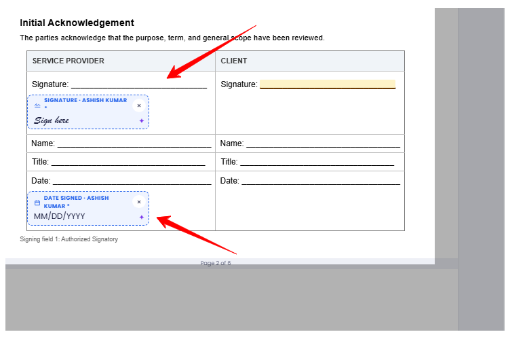
You can review the detected fields and check whether they are placed in the correct locations. This helps reduce the manual work involved in preparing a document for signing.
Step 6: Send the Document for Signing
Review and Send Your Signing Request
Once the document is ready, review the details and click the Send button.
A confirmation window will appear. Check the information displayed before proceeding with the sending process.
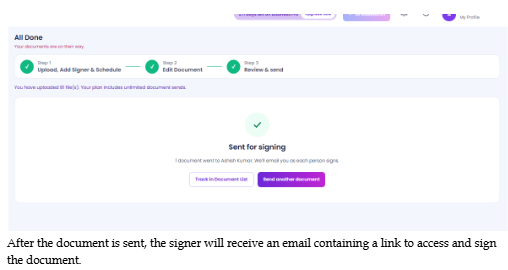
After the document is sent, the signer will receive an email containing a link to access and sign the document.
Step 7: Open the Signing Request
Access the Document Through Your Email
Now, let’s look at the process from the signer’s side.
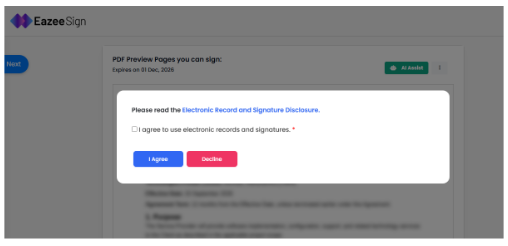
As soon as you send the document, the recipient receives an email with a signing link. The signer can open this email and click the link to access the document.
After agreeing to proceed, the signer will be able to view the document shared with them.
There is no need to print the document or exchange physical copies to complete this step.

The Signer will get the email as soon as you click the send button.
Step 8: Add & Apply Your Signature
Choose How You Want to Sign the Document
Once the document opens, the signer can choose from different ways to add their signature.
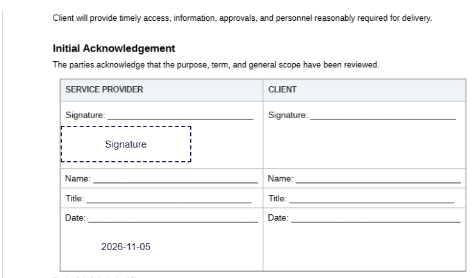
EazeeSign provides three signing options:
- Type: Type your name to create a signature.
- Draw: Draw your signature using the available signing area.
- Upload: Upload an existing signature image.
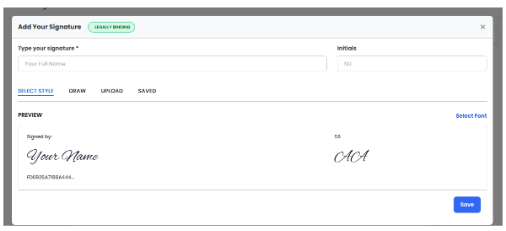
Choose the option you prefer, save your signature & apply it to the required signature field.
Once all the required fields are completed, follow the on-screen instructions to finish signing.
Step 9: View the Document Audit Trail
Check the Complete History of Document Activity
Signing is not the only important part of managing a document. You may also need to know what happened after it was sent.
EazeeSign provides a document audit trail that records the activities associated with the signing process.
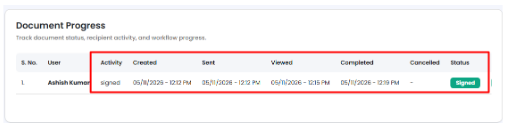
You can review the document history to understand what actions took place and when they happened. This gives you a clear record of the signing activity for future reference.
What Are the Benefits of Signing a PDF Online?
Online PDF signing is useful for individuals as well as businesses. It reduces the number of manual steps involved in handling documents.
Here are a few practical benefits.
1. No Printing or Scanning
You do not need to print a document just to add your signature. The entire process can be completed online, which also reduces paper usage.
2. Sign Documents From Different Locations
You can access your documents from a computer or mobile device. This is useful when signers are working from different offices, cities or locations.
3. Faster Document Approvals
Physical documents often require printing, scanning, courier services or in-person meetings. Online signing reduces these steps — and makes it easier to collect signatures.
4. Track Document Activity
Some electronic signature platforms provide document status updates and audit trails. These records help users understand who has signed & when the signing activity took place.
5. Manage Multiple Signers
When an agreement needs approval from more than one person an online signing tool can simplify the process. Features such as multi party signing and signing order help manage the workflow.
What Should You Check Before Choosing an Online PDF Signing Tool?
Not every PDF signing tool offers the same features. Some are designed for occasional personal use while others support regular business document workflows.
Before selecting a tool to free sign PDF online, consider these points:
- Ease of use: The upload & signing process should be simple.
- Document limits: You should check how many documents you can sign under the available plan.
- Multiple signers: Always look for support if your documents need signatures from multiple persons.
- Tracking: Check whether you can see when a document is opened, viewed or signed.
- Audit trail: A record of document activity can be useful for future reference.
- Security and access: Review the provider’s stated security practices and access controls.
- Pricing: Understand the free usage limits, subscription charges & available features.
These checks can help you choose a tool that suits your requirements instead of switching platforms later.
Why Consider EazeeSign for Online PDF Signing?
If you regularly send documents for signatures, managing each request through email can become difficult. You may have to follow up with recipients, check document status and organise completed files separately.
EazeeSign brings these activities together in one platform. Along with electronic signature functionality, it offers features such as multi-party signing, real-time document tracking, automatic reminders, templates, bulk sending and audit trails.
It also includes AI-powered capabilities such as document summarisation, key clause analysis and red flag detection. These features can help users review documents and understand important information before signing.
You can explore EazeeSign’s electronic signature software to learn more about its document signing and management capabilities.
Whether you need to sign an occasional PDF or manage documents for your business, choose a platform based on the features & usage limits that match your needs.
Conclusion
Signing a PDF online can save time and remove the need for printing, scanning and physical document exchange. The process is simple: upload your document, add the required signature fields, enter recipient details and complete the signing workflow.
If you are looking for a way to free sign PDF online, compare the available tools based on their features, document limits and signing requirements.
EazeeSign offers an electronic signature platform that brings document signing, tracking and management together. Explore its features and see how it fits into your document workflow.
Frequently Asked Questions
1. How can I sign a PDF online without printing it?
You can use an online electronic signature platform. Upload your PDF, add the required signature fields, complete the signing process and access the signed document online.
2. Can I sign a PDF online without downloading software?
Yes. Browser-based PDF signing tools let you upload and sign documents online without installing desktop software. However, some platforms may require an account or have usage limits.
3. How do I add my electronic signature to a PDF?
Open your PDF using an electronic signature tool, upload the document and place the signature field in the required location. Follow the platform’s instructions to complete the signing process.
4. Can I sign a PDF online using my mobile phone?
Yes. Many electronic signature platforms support mobile devices. You can access the platform through a mobile browser or an available mobile app, upload or open the document and complete the signing process.
5. Is an electronic signature on a PDF legally valid in India?
Electronic signatures are recognised under the Information Technology Act, 2000, in India. However, the legal validity and acceptable signing method depend on the document, applicable legal requirements and type of signature used. Certain documents may require specific forms of execution, such as a prescribed digital signature or other formalities.